


My Dig Site Doesn’t Have a Specific Address—How Do I Submit a Ticket?
If you ever find yourself needing to break ground in a location without a specific address—perhaps somewhere within a large lot, on a farm, or within a park—Gopher State One Call (GSOC) has got you covered. Keep reading for the key steps and a couple helpful tips to having such a dig site properly located so that you can carry out a successful project.
White Line Your Dig Site
The first step is to “white line” or “white mark” the perimeter of your dig site with white spray paint or flags. You can purchase either at your local hardware store. Doing so helps to clearly identify the dig site, as locators know to look for the white markings to clarify the intended area, especially when marking underground facilities within a remote area or large lot.
As of August 1, 2024, physical white lining is required by Minnesota State Statute 216D. Beginning January 1, 2026, an excavator may utilize electronic white lining when submitting a locate request ticket online, if those electronic markings provide the same level of information as a physical mark. If you choose to electronically white line, the Minnesota Common Ground Alliance (MNCGA) has suggested practices to provide enough information for locators and operators. In addition, an operator may request a physical mark at any time.
Submit Your Locate Request Ticket
The next step is to submit your locate request ticket through GSOC at least 48-hours before you intend to break ground, not including the day of submission, weekends, or holidays. Tickets can be submitted online at gopherstateonecall.org, using the GSOC app, or by calling 8-1-1. When digging in a more remote area, we recommend submitting your ticket online though ITIC, GSOC’s online ticketing system. ITIC allows you to mark your dig site on a map using a variety of drawing tools, making it very clear where the dig site is located, even if it’s within a large lot. You’ll also be asked to provide marking/driving instructions, allowing you to provide additional direction and context to accessing and identifying the dig site.
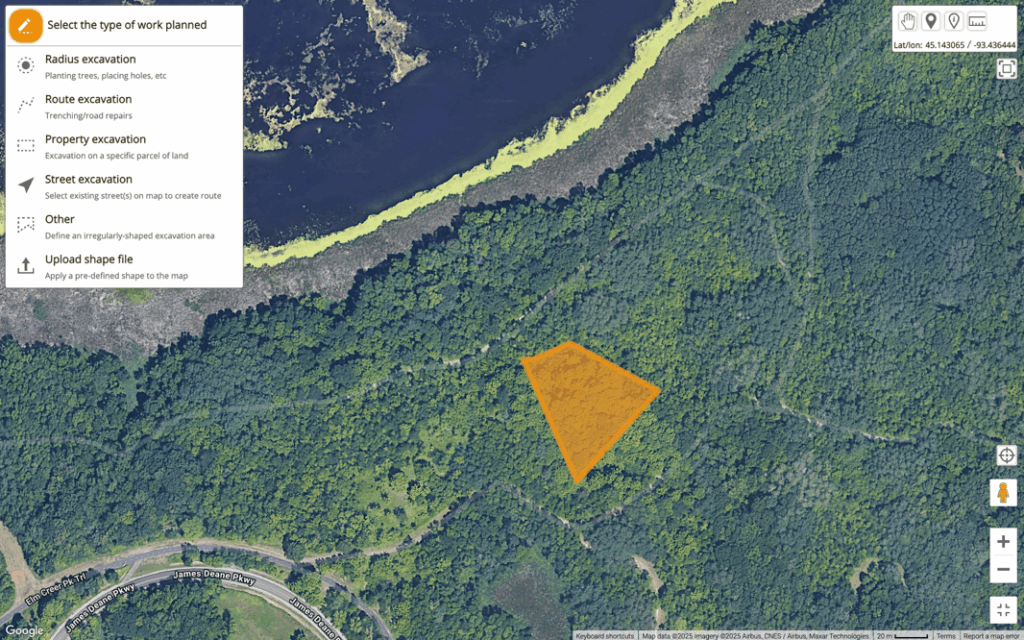
You are still welcome to submit your ticket over the phone. If you do, please be prepared to describe how to drive to the dig site and any identifiable reference points that can be given to help guide locators to the correct location.
Know You May Receive Calls from Locators
When submitting your ticket, you’ll be asked to provide a contact phone number. If locators need assistance in finding or identifying the intended dig site during the 48-hour waiting period (which excludes the day of submission, weekends, and holidays), they may call you for extra clarification. Answering these calls can help them mark efficiently and keep your project on schedule.
Meet Tickets are Required for Larger Projects
If your project involves excavation of one mile or more in length or any combination of notices provided for adjacent geographic sections that, when combined, meet or exceed the minimum excavation length of one mile, you are required to file a Meet Ticket with GSOC. Meet Tickets should also be used if a project will be completed over time or sections need to be marked at different times. Click here to learn more about Meet Tickets.
If you have questions regarding the ticket submission process, submitting tickets for remote locations, or anything 811-related, contact our Customer Support team at 651-681-7326 or send us an email at [email protected].