The leaves are starting to change and the weather is cooling off. In Minnesota, that means peak construction season is beginning to come to an end. Before you close out this year’s digging season, make sure to review 811 best practices so they’re top of mind during the off-season and beyond. Check out the reminders and resources below.
Online Excavator Training: Two Free Options
If you’re new to excavation or looking to enhance your existing knowledge, consider trying these free, high-quality online training options:
GSOC and Underground Safety Academy offer the Dig Safe Training and Certification course—a self-paced program covering the GSOC Handbook and Minnesota State Statute 216D to build a strong safety foundation. Click here to access the course.
The Common Ground Alliance (CGA) also provides a comprehensive online curriculum that delivers practical insights through interactive modules, resources, and knowledge checks for all experience levels. The training is available in both English and Spanish. CGA membership is not required. Click the URL that best suits your needs below.
English: https://training.commongroundalliance.com/curriculum/english/
Spanish: https://training.commongroundalliance.com/curriculum/spanish/
Ticket Information and Best Practices
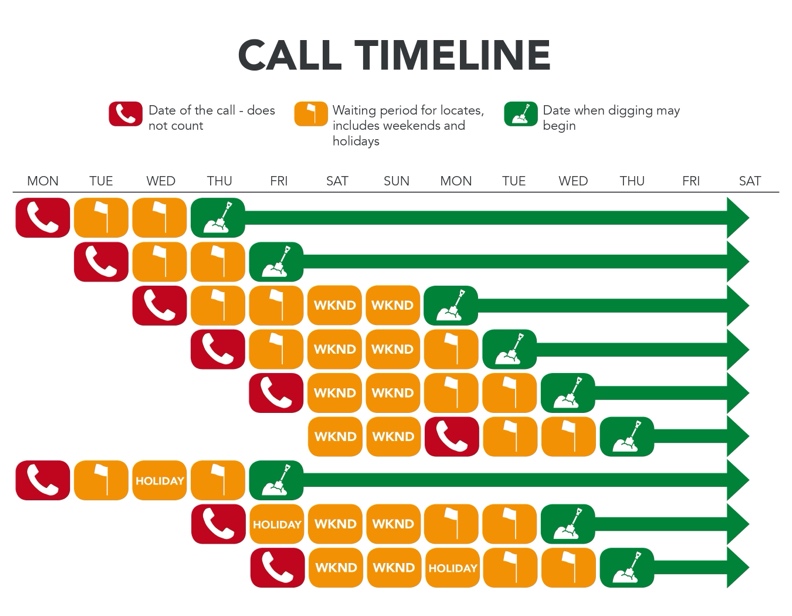
Check out the Ticketing section of the Gopher State One Call website for comprehensive ticket resources. This section contains helpful information about how to submit a ticket, the available ticket types, and more. You can also visit our Resource Center for a variety of downloadable materials covering best practices for any type of excavator, printable guides and reference sheets (the Call Timeline is one of our most popular!), and practical software overviews.
For more information on what’s included in the email copy of an 811 ticket, take a look at our recent blog post, Unpacking an 811 Ticket.
White Lining
All excavators in MN are required to “white line” or “white mark” their intended excavation area (encompassing the entire excavation area) prior to submitting a locate request. Professional excavators can now use electronic white lininginstead of physical marks, if the electronic markings provide at least as much information as physical white marking. Updated guidance on electronic white lining is available on the GSOC blog, and the Minnesota Common Ground Alliance (MNCGA) offers a list of suggested practices as well.
Positive Response
As a reminder, effective August 1, 2026, all facility operators are now required to provide an electronic positive response on each excavation notice they receive through the notification center prior to expiration of the required locate period. To learn more about this change or about ticket responses, click here to visit our Positive Response page.
Remember: Make sure that each underground facility has been marked or cleared before you commence any excavation! If you have any questions on a positive response status, each ticket contains contact information for the listed facility operators.
Maintaining Marks
Once marks are placed by a locator, it is the excavator’s responsibility to reasonably protect and preserve those marksuntil they are no longer required for proper and safe excavation near the underground facilities. If the excavator has reason to believe locate markings are obliterated, obscured, missing, or incorrect, the excavator must notify the facility operator to refresh the marks or remark the excavation area. The emailed copy of your ticket includes information on how to refresh marks or extend the life of an 811 ticket.
Documenting the Jobsite
Before starting any project, it’s important to inspect the job site to ensure all necessary marks (those that were not cleared) are accounted for. It can also be helpful to take photos of the marks for reference in case of a damage or to determine if the marks need to be refreshed later in the project.
If a damage does occur, take pictures of the site if safe to do so. This will help create helpful documentation for future reference.
Questions? You can reach our team by contacting our Customer Support team at 651-681-7326 or [email protected].